Graphic Design Course in Delhi

Red Pixels Web Design

Best Graphic Design Institutes in Delhi


We are best in what we deal, with 100% job placement this year we provide best learning experience with industry best trainers.
graphic design course in delhi

best graphic design course in delhi

Are you looking for Graphic Designing Course in Delhi?


Red Pixels is ranked number 1 institute in Laxmi Nagar, Delhi for GRAPHIC DESIGNING COURSE by GOOGLE SEARCH RESULT 2025-26.

Red Pixels offers professional training course for Graphic Designing Advance Certification Course in Delhi. Our Graphic Designing Expert Program in Delhi (6 months) introduces students to Graphic Design Concepts, Design Principles and Industry Best Design Softwares. Graphic Design certificate can enhance your ability to get "Graphic Designing Jobs in Delhi", higher pay scale. Our certification training program will simply help you do work faster and more efficiently by developing your design and software proficiency.

Graphic Design Courses at Red Pixels is designed for individuals who are interested in applying their creativity to communicating ideas and concepts in both print and digital media.

In short, Graphic Design is the process of using the computer and specific types of software to combine ideas and artworks to produce documents properly formatted for print, web, or mobile devices such as UI Designs, Illustrations, Digital/Matte Art, Logo Design, Packaging etc.

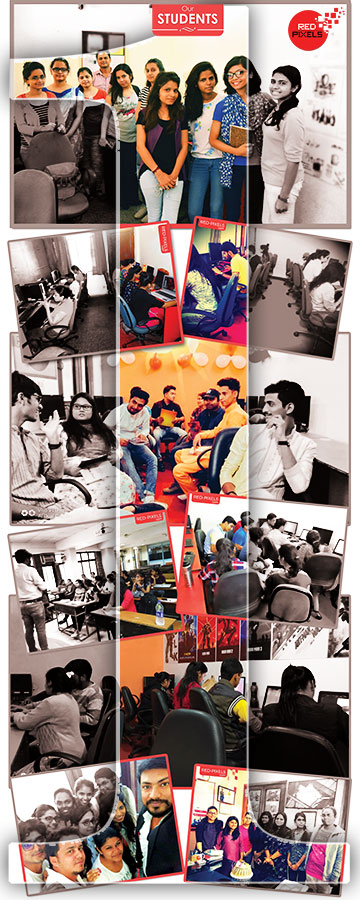
View Students's Works
RED PIXELS - graphic design course online

Why Red Pixels


Why should you choose us over the competition?


EXPERIENCE:

Having 12+ Years of Quality Services, We have experienced and well trained IT trainers with a glorious five to ten years of experince in Art, Design & Technology, we bring a broad base of experience and knowledge to our special courses. We are passionate about our services and our each and every students growth.

ONE-TO-ONE CLASSES:

We prefer One-to-One Classes rather making a huge batch. The One-to-One classes focus 100% on your specific needs and objectives. We work on all areas you need to strengthen and work with you to meet your individual goals. The major benefits of One-to One classes is you will identify the specific areas and skills that you wish to improve.

100% PRACTICAL CLASSES:

We offer 100% practical classes for our students so each and every student get personal computer in classroom for software practice session.

FLEXIBILITY:

We are best Design and Animation Studio in Delhi and we prefer flexible timing for our students so every student can concentrate more enthusiastic and relaxed in their work.

MONTHLY FEEDBACKS & ASSIGNMENTS:

With a quick monthly feedback and assignments, we help our students to achieve each and every topic thoroughly on time. We are passionate about the design principles and about helping our students succeed and gain a competitive advantage.

100% JOB ASSISTANCE:

We provide 100% Job assistance to our students in Design Studios, Ad Agencies, E-Learning Companies, Multinational Componies every year.

CREATIVITY:

Creativity is defined as the act of turning alternatives, possibilities or imaginative ideas into reality. Examine our Students's Works page and you will see how our student works. We hope this is an indicator of our creative abilities.

AFFORDABLE FEES:

We offer industry best training courses with affordable course fees with easy installments.

LATEST SOFTWARES:

We use the latest Windows and Macintosh software packages so that you always keep yourself a step ahead.

COURSE SCHEDULE

Classes Modes Course Duration No. of Days
Regular Mode: 6 Months Alternate Days(MWF/TTS)
Rapid Mode: 3 Months 5 Days/Week (Monday to Friday)
Weekend Only: 6 Months Saturday & Sunday

COURSE OUTLINE

best-photoshop-institute-in-laxmi-nagar-delhi

Adobe Photoshop


Module - 1

  • Navigating Photoshop
  • Tools and Interfaces
  • Raster vs Vector Concepts
  • Understanding Layers Concept
  • Working with Adjustment Layers
  • Group, Hide, Merge and Lock Layers
  • Clipping Mask, Layer Mask
  • Working with Different Layer Styles
  • Rulers, Guides and Grids
  • Working with Selections
  • Advanced Selection Concepts
  • Module - 2

  • Image Retouching & Color Balance
  • Image Inhancements Tips
  • Mastering Gradient Tool
  • Working with Different File Formats
  • Making First GIF Project
  • Applying Filters & Effects
  • Collage Making
  • Working with Frame Tool
  • Vector Illustration with Shape Tools
  • Camera Raw Filters
  • Module - 3

  • Pen Tool Advance Tips
  • Working with Brush Tool
  • Pattern/Texture Making
  • Working with Type Tool
  • Masking with Text
  • Text Warping and Typesetting
  • Working with Paragraph Text
  • Concepts of Artboards
  • Place Linked Vs Place Embedded
  • Module - 4

  • Photoshop Shortcuts
  • Setting Guide, Grid in Project File
  • Creating JPEG, PNG and PDFs
  • Timeline Animation to Create GIFs
  • Working with Photoshop Scripts
  • Exploring Menu Bars
  • Advance Tips and Tricks
  • Doubt Clearning Session
best-illustrator-institute-in-laxmi-nagar-delhi

Adobe Illustrator


Module - 1

  • Navigating Adobe Illustrator
  • Tools and Interfaces
  • Introduction to Vector Illustration
  • Usage of Magic Wand & Lasso Tool
  • Mastering Pen tool & Curvature Tool
  • Creating First Shape in Illustrator
  • Scale, Rotate, Skew and Reflect Tools
  • Shaper Tool & Pencil Tool Set
  • Eraser, Scissors & Knife Tool
  • Width & Other Distortion Tools
  • Free Transform Tool & Puppet Warp Tool
  • Module - 2

  • Mastering Shape Builder Tool
  • Gradient & Mesh Tool
  • Symbols & Pattern Making
  • Graph Options in Illustrator
  • Alignment & Distribution
  • Working with Advance Blend Option
  • Using Symbol Sprayer Set
  • Working with Line Tool, Arc Tool
  • Understanding Fill & Stroke Colors Concept
  • Working with Symmetrical Shapes
  • Free Transform Tools Usage on Shapes
  • Module - 3

    • Point Type & Area Type Text Options
    • Advance Text Properties Options
    • Image Tracing Options
    • Image to Vector Art Illustration
    • Working on Paths & Selections
    • Logo Design Concepts
    • Cartoon Character Design
    • Creating Multiple Pages PDFs
    • Working on Multiple Artboards
    • Creating JPEG, PNG and SVG
    • Offset Path & Compound Path
    • Module - 4

    • Working with 3D & Materials
    • Distort & Transform Options
    • Explore Pathfinder Options
    • Different Stylize Options
    • Shape Warp Options
    • Rulers, Guides, Grids & Smart Guide
    • Clipping Maks (with Images)
    • Advance Tips and Tricks
    • Doubt Clearning Session
best-indesign-institute-in-laxmi-nagar-delhi

Adobe InDesign


Module - 1

  • Navigating Adobe InDesign
  • Tools and Interfaces
  • Advance Typesetting Options
  • Page Tool & Gap Tool
  • Content Collector & Distributor Tools
  • Usage of Frame Tool
  • Importing SVG & EPS in InDesign
  • Working with Scale, Rotate
  • Skew and Reflect Tools
  • Line Tool & Pencil Tool Set
  • Gradient & Gradient Feather Tool
  • Module - 2

    • Text Wrap, Drop Cap and Tab Setting
    • Working with Multiple Column Text
    • Mastering Pages, Links and Layers
    • Working with Master/Parent Pages
    • Working on Multiple Pages
    • Margins, Slug & Bleed Area
    • Exporting PDFs from InDesign
    • Working with Automatic Page Numbers
    • Creating Print & Interactive PDFs
    • Working with Story Editor
    • Adding Tab Option in Paragraph Text
best-coreldraw-institute-in-laxmi-nagar-delhi

CorelDraw


    Module - 1

    • Navigating CorelDraw
    • Tools and Interfaces
    • Rectangle, Ellipse, Polygon
    • Working with Vector Shapes
    • Advanced Usages of Shape Tool
    • Pen Tool & Bezier Tool
    • Freehand & Polyline Tool
    • Cartoon Character Design
    • Working with Nodes and Curves
    • Module - 2

      • Concepts of Pages
      • Creating Multiple Pages PDFS
      • Understanding Laye Concepts
      • Page Numbering and Header Footer
      • Working on Complex Designs
      • Vector Illustrations
      • Banner Designing
      • Pamphlet & Poster Making
      • Module - 3

        • Creating JPEG, PNG and EPS
        • Image Adjustment and Effects
        • Distort & Transform Options
        • Usage of Different Color Pallete
        • Working on Dimension Tools
        • Working on Connector Tool
        • Module - 4

          • Text Formatting and Typesetting
          • Text into Table, Tab Setting
          • Applying Different Text Styles
          • Weld, Trim and Intersect Tool
          • Shadow, Contour and Transparency Tool
          • Fill, Fountain Fill and Pattern Fill
          • Snap, Align and Distribute
          • Advance Tips and Tricks
          • Doubt Clearning Session

Admissions Open for 2026-27 Session. Join Today

Awards & Recognition


As we offer top class software training in delhi, we are proud that thousand of students got placements after joining our special training courses and this is our real Awards and recognition.

Join Us Today

Red Pixels Awards
Registered under MSME - Gov. of India
2022 - Present
Red Pixels Awards
Certified By International Accreditation Forum
2017
Red Pixels Awards
ISO 9001 : 2015 Certified Institution
2017
Red Pixels Awards
100% Job Assistance & Placement
2014 - Present
No. 1 Multimedia Inst.- JustDial
2015 - Present
Google Verified Training Institute
2016 - 2017
Best Design Training - Sulekha
2014 - Present
Top IT Training with Best Placement - UrbanPro
2015 - Present

Looking for the Best Graphic Design Course in Delhi?